SQLExplain Team
How to Design a Database Schema for a Social Media Platform in PostgreSQL

How to Design a Database Schema for a Social Media Platform
Introduction
Social media platforms like Twitter and Instagram look deceptively simple from the outside — users post things, follow each other, and react to content. But the data model underneath has to handle a self-referencing social graph, polymorphic likes (on both posts and comments), nested comment threads, real-time messaging with conversation groups, many-to-many hashtag relationships, and a fan-out notification system. Get the schema wrong early and you'll spend months untangling it later.
In this guide, we'll build a complete, production-grade PostgreSQL schema for a social media platform from the ground up. We'll cover:
- How to model a self-referencing follow graph with a composite primary key
- Why visibility and media type columns belong on
posts, not in separate tables - How to handle likes on both posts and comments in a single
likestable with nullable foreign keys - How to model threaded comments using a
parent_comment_idself-reference - How to wire hashtags to posts with a clean many-to-many junction table
- Five real-world SQL queries you'd run in production, including window functions and CTEs
Step 1: Identify the Entities
Before writing any DDL, map out what the system needs to track. A social media platform must answer questions like:
- Who is on the platform? → users
- What do they share? → posts with optional media
- How do they react? → likes on posts and comments
- How do they discuss? → comments (with replies) on posts
- Who do they follow? → follows (a self-referencing graph on users)
- How do they message? → conversations containing messages
- What topics exist? → hashtags linked to posts via post_hashtags
- What alerts do they receive? → notifications
| Table | Description |
|---|---|
users | Profiles with display name, bio, avatar, and verification status |
posts | Content shared by users — text, image, or video — with visibility control |
comments | Threaded replies on posts; supports nested replies via parent_comment_id |
likes | Reactions on posts or comments (polymorphic via nullable FK columns) |
follows | Directional follow relationships between users |
conversations | A container for a message thread between two or more users |
conversation_participants | Junction table linking users to conversations |
messages | Individual messages inside a conversation |
hashtags | Distinct hashtag names (each stored once) |
post_hashtags | Many-to-many junction linking posts to hashtags |
notifications | In-app alerts for likes, comments, follows, and mentions |
Step 2: Define the Relationships
Understanding cardinality before writing DDL prevents the most common mistakes — missing foreign keys, incorrect composite keys, and tables that are impossible to query efficiently.
- A user publishes many posts
- A post has many comments; each comment can have many replies (self-referencing
parent_comment_id) - A user can like many posts or comments (one
likestable with two nullable FK columns) - A user can follow many other users — and be followed by many — via the self-referencing follows junction
- A conversation links many users (via
conversation_participants) and contains many messages - A post is associated with many hashtags, and a hashtag appears on many posts, via post_hashtags
- A user receives many notifications of different types (LIKE, COMMENT, FOLLOW, MENTION)
DBA Tip: The
likestable uses two nullable FK columns —post_idandcomment_id— to handle polymorphic reactions in a single table. Add aCHECKconstraint to ensure exactly one is populated. This is simpler than aliked_entity_type+liked_entity_idpattern, which breaks referential integrity.
Step 3: Build the Schema
We're using PostgreSQL throughout. Key design decisions:
UUIDprimary keys viagen_random_uuid()— opaque, safe to expose in APIs, no integer overflow risk on high-volume tables likelikesandnotificationsVARCHAR + CHECKinstead ofENUM— easier to extend status/type values withoutALTER TYPEmigrationsTIMESTAMPTZeverywhere — always store timestamps with time zoneON DELETE CASCADEon user-owned data — post, comment, follow, and notification records clean up automatically when an account is deleted- Composite primary key on
follows— (follower_id,following_id) is inherently unique; no need for a surrogatefollow_id
-- Enable UUID generation (required once per database)
CREATE EXTENSION IF NOT EXISTS pgcrypto;

-- ============================================================
-- USERS
-- ============================================================
CREATE TABLE users (
  user_id      UUID         PRIMARY KEY DEFAULT gen_random_uuid(),
  username     VARCHAR(50)  UNIQUE NOT NULL,
  email        VARCHAR(255) UNIQUE NOT NULL,
  password_hash TEXT        NOT NULL,
  display_name VARCHAR(100),
  bio          TEXT,
  avatar_url   VARCHAR(500),
  is_verified  BOOLEAN      NOT NULL DEFAULT FALSE,
  created_at   TIMESTAMPTZ  NOT NULL DEFAULT NOW()
);

-- ============================================================
-- POSTS
-- ============================================================
CREATE TABLE posts (
  post_id    UUID        PRIMARY KEY DEFAULT gen_random_uuid(),
  user_id    UUID        NOT NULL REFERENCES users(user_id) ON DELETE CASCADE,
  content    TEXT,
  media_url  VARCHAR(500),
  media_type VARCHAR(10)
    CHECK (media_type IN ('IMAGE', 'VIDEO', 'TEXT')),
  visibility VARCHAR(20) NOT NULL DEFAULT 'PUBLIC'
    CHECK (visibility IN ('PUBLIC', 'PRIVATE', 'FOLLOWERS_ONLY')),
  created_at TIMESTAMPTZ NOT NULL DEFAULT NOW()
);

-- ============================================================
-- COMMENTS  (threaded via self-reference)
-- ============================================================
CREATE TABLE comments (
  comment_id        UUID        PRIMARY KEY DEFAULT gen_random_uuid(),
  post_id           UUID        NOT NULL REFERENCES posts(post_id) ON DELETE CASCADE,
  user_id           UUID        NOT NULL REFERENCES users(user_id) ON DELETE CASCADE,
  parent_comment_id UUID        REFERENCES comments(comment_id) ON DELETE CASCADE,
  content           TEXT        NOT NULL,
  created_at        TIMESTAMPTZ NOT NULL DEFAULT NOW()
);

-- ============================================================
-- LIKES  (polymorphic: post like OR comment like)
-- ============================================================
CREATE TABLE likes (
  like_id    UUID        PRIMARY KEY DEFAULT gen_random_uuid(),
  user_id    UUID        NOT NULL REFERENCES users(user_id) ON DELETE CASCADE,
  post_id    UUID        REFERENCES posts(post_id)    ON DELETE CASCADE,
  comment_id UUID        REFERENCES comments(comment_id) ON DELETE CASCADE,
  created_at TIMESTAMPTZ NOT NULL DEFAULT NOW(),
  -- Exactly one of post_id or comment_id must be set
  CHECK (
    (post_id IS NOT NULL AND comment_id IS NULL) OR
    (post_id IS NULL    AND comment_id IS NOT NULL)
  ),
  -- Prevent duplicate likes
  UNIQUE (user_id, post_id),
  UNIQUE (user_id, comment_id)
);

-- ============================================================
-- FOLLOWS  (self-referencing social graph)
-- ============================================================
CREATE TABLE follows (
  follower_id  UUID        NOT NULL REFERENCES users(user_id) ON DELETE CASCADE,
  following_id UUID        NOT NULL REFERENCES users(user_id) ON DELETE CASCADE,
  created_at   TIMESTAMPTZ NOT NULL DEFAULT NOW(),
  PRIMARY KEY (follower_id, following_id),
  CHECK (follower_id <> following_id)   -- can't follow yourself
);

-- ============================================================
-- CONVERSATIONS
-- ============================================================
CREATE TABLE conversations (
  conversation_id UUID        PRIMARY KEY DEFAULT gen_random_uuid(),
  is_group        BOOLEAN     NOT NULL DEFAULT FALSE,
  created_at      TIMESTAMPTZ NOT NULL DEFAULT NOW()
);

-- ============================================================
-- CONVERSATION PARTICIPANTS
-- ============================================================
CREATE TABLE conversation_participants (
  conversation_id UUID        NOT NULL REFERENCES conversations(conversation_id) ON DELETE CASCADE,
  user_id         UUID        NOT NULL REFERENCES users(user_id) ON DELETE CASCADE,
  joined_at       TIMESTAMPTZ NOT NULL DEFAULT NOW(),
  PRIMARY KEY (conversation_id, user_id)
);

-- ============================================================
-- MESSAGES
-- ============================================================
CREATE TABLE messages (
  message_id      UUID        PRIMARY KEY DEFAULT gen_random_uuid(),
  conversation_id UUID        NOT NULL REFERENCES conversations(conversation_id) ON DELETE CASCADE,
  sender_id       UUID        NOT NULL REFERENCES users(user_id) ON DELETE CASCADE,
  content         TEXT        NOT NULL,
  is_read         BOOLEAN     NOT NULL DEFAULT FALSE,
  created_at      TIMESTAMPTZ NOT NULL DEFAULT NOW()
);

-- ============================================================
-- HASHTAGS  (each tag stored once)
-- ============================================================
CREATE TABLE hashtags (
  hashtag_id UUID         PRIMARY KEY DEFAULT gen_random_uuid(),
  name       VARCHAR(100) UNIQUE NOT NULL
);

-- ============================================================
-- POST_HASHTAGS  (many-to-many junction)
-- ============================================================
CREATE TABLE post_hashtags (
  post_id    UUID NOT NULL REFERENCES posts(post_id)       ON DELETE CASCADE,
  hashtag_id UUID NOT NULL REFERENCES hashtags(hashtag_id) ON DELETE CASCADE,
  PRIMARY KEY (post_id, hashtag_id)
);

-- ============================================================
-- NOTIFICATIONS
-- ============================================================
CREATE TABLE notifications (
  notification_id UUID        PRIMARY KEY DEFAULT gen_random_uuid(),
  user_id         UUID        NOT NULL REFERENCES users(user_id) ON DELETE CASCADE,
  type            VARCHAR(20) NOT NULL
    CHECK (type IN ('LIKE', 'COMMENT', 'FOLLOW', 'MENTION')),
  reference_id    UUID,       -- ID of the related post, comment, or user
  is_read         BOOLEAN     NOT NULL DEFAULT FALSE,
  created_at      TIMESTAMPTZ NOT NULL DEFAULT NOW()
);

-- ============================================================
-- INDEXES
-- ============================================================
CREATE INDEX idx_posts_user_created        ON posts(user_id, created_at DESC);
CREATE INDEX idx_posts_visibility          ON posts(visibility);
CREATE INDEX idx_comments_post             ON comments(post_id, created_at ASC);
CREATE INDEX idx_comments_parent           ON comments(parent_comment_id);
CREATE INDEX idx_likes_post                ON likes(post_id);
CREATE INDEX idx_likes_comment             ON likes(comment_id);
CREATE INDEX idx_follows_following         ON follows(following_id);
CREATE INDEX idx_messages_conversation     ON messages(conversation_id, created_at ASC);
CREATE INDEX idx_messages_sender           ON messages(sender_id);
CREATE INDEX idx_post_hashtags_hashtag     ON post_hashtags(hashtag_id);
CREATE INDEX idx_notifications_user_unread ON notifications(user_id, is_read, created_at DESC);
Step 4: ER Diagram
The entity-relationship diagram for this schema at a high level:
Scroll or pinch to zoom · drag to pan · double-click to zoom in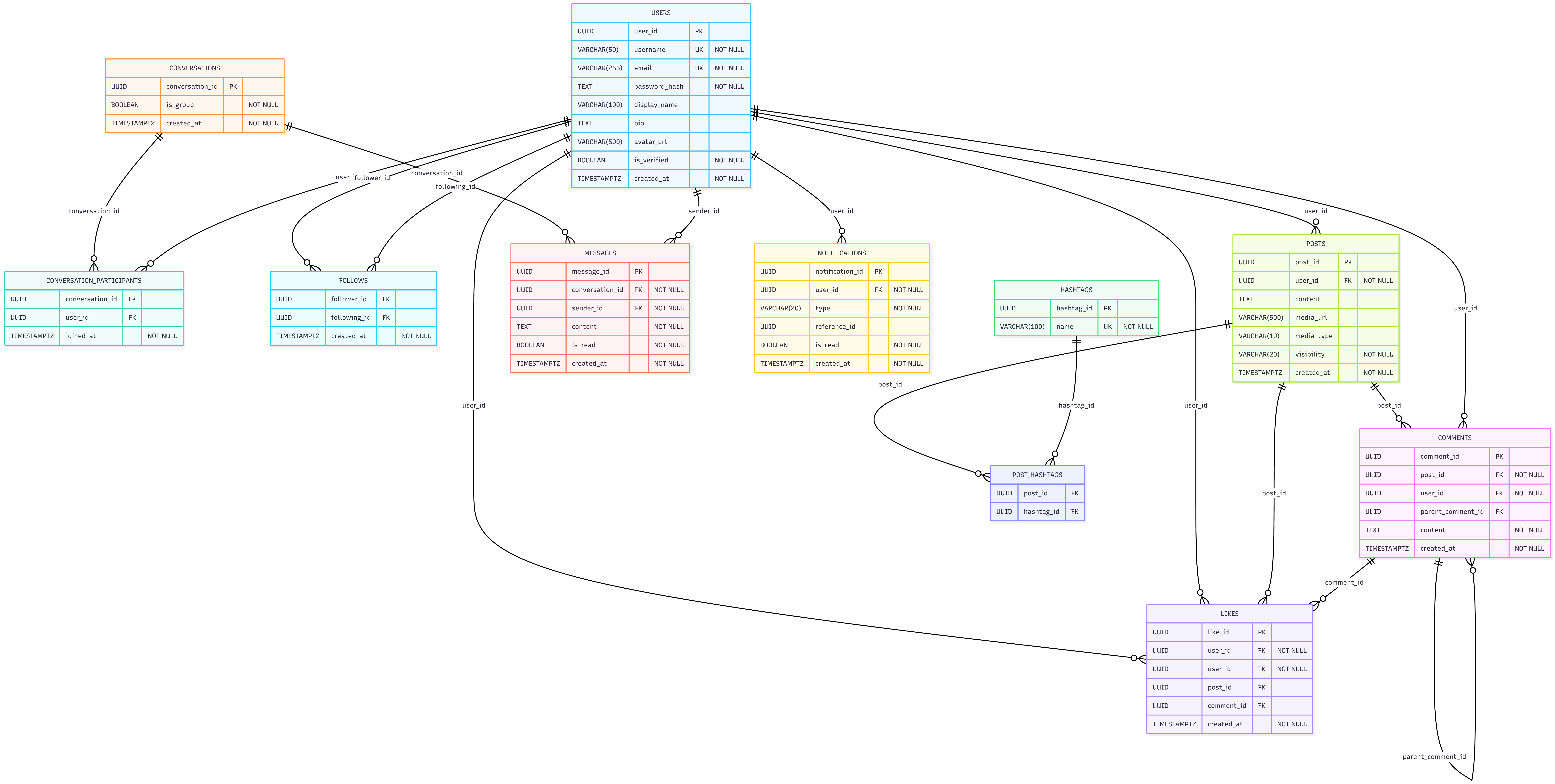
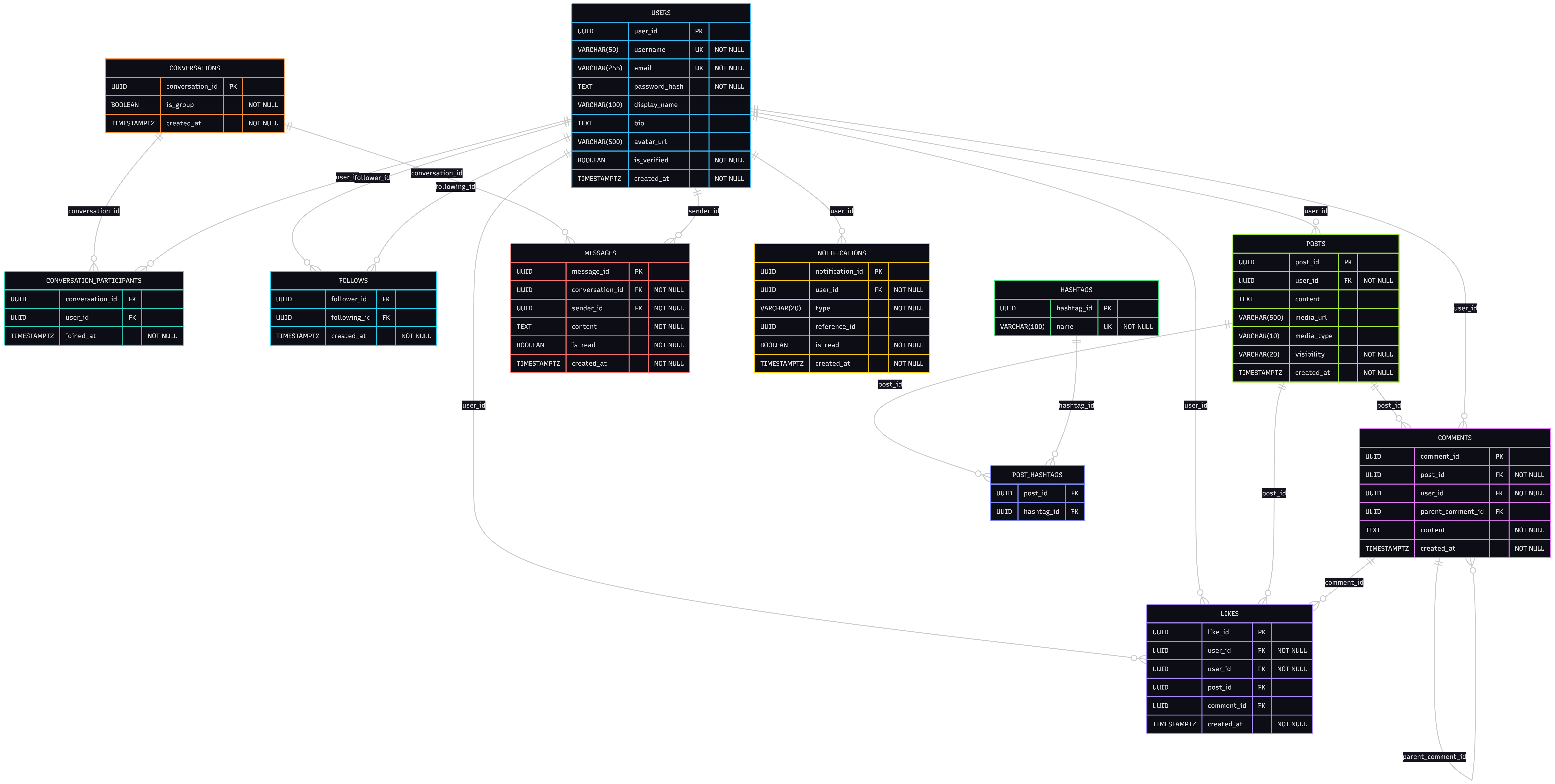
The follows table is a self-referencing many-to-many junction on users — the same pattern appears in likes (polymorphic) and post_hashtags (classic many-to-many). Notice that comments is self-referencing too: parent_comment_id points back to the same table to support threaded replies at any depth.
Step 5: Example Queries
Query 1 — User Feed (Posts from Followed Accounts)
The core feed query: find recent public posts from everyone the current user follows, newest first.
SELECT
  p.post_id,
  u.username,
  u.avatar_url,
  p.content,
  p.media_url,
  p.media_type,
  p.created_at,
  COUNT(DISTINCT l.like_id)    AS like_count,
  COUNT(DISTINCT c.comment_id) AS comment_count
FROM follows f
JOIN users  u ON f.following_id = u.user_id
JOIN posts  p ON u.user_id = p.user_id
LEFT JOIN likes    l ON p.post_id = l.post_id
LEFT JOIN comments c ON p.post_id = c.post_id
WHERE f.follower_id  = 'your-user-uuid-here'
  AND p.visibility  IN ('PUBLIC', 'FOLLOWERS_ONLY')
  AND p.created_at  >= NOW() - INTERVAL '7 days'
GROUP BY p.post_id, u.username, u.avatar_url, p.content,
         p.media_url, p.media_type, p.created_at
ORDER BY p.created_at DESC
LIMIT 50;
DBA Tip: Filtering on
created_at >= NOW() - INTERVAL '7 days'before the aggregation dramatically reduces the number of rows the database has to process. On large tables, always filter on indexed columns early.
Query 2 — Trending Hashtags in the Last 24 Hours
Count how many posts used each hashtag in the past day, then rank them. This is the data behind a "Trending" sidebar.
SELECT
  h.name                AS hashtag,
  COUNT(ph.post_id)     AS post_count
FROM post_hashtags ph
JOIN hashtags h ON ph.hashtag_id = h.hashtag_id
JOIN posts    p ON ph.post_id    = p.post_id
WHERE p.created_at  >= NOW() - INTERVAL '24 hours'
  AND p.visibility   = 'PUBLIC'
GROUP BY h.hashtag_id, h.name
ORDER BY post_count DESC
LIMIT 10;
Query 3 — Mutual Followers Between Two Users
Find users that both User A and User B follow — the "mutual friends" concept. A CTE keeps the logic readable.
WITH followers_of_a AS (
  SELECT following_id
  FROM follows
  WHERE follower_id = 'user-a-uuid-here'
),
followers_of_b AS (
  SELECT following_id
  FROM follows
  WHERE follower_id = 'user-b-uuid-here'
)
SELECT
  u.user_id,
  u.username,
  u.display_name,
  u.avatar_url
FROM followers_of_a fa
JOIN followers_of_b fb ON fa.following_id = fb.following_id
JOIN users u            ON fa.following_id = u.user_id
ORDER BY u.username;
Query 4 — Unread Message Count Per Conversation
Useful for rendering a conversation list with badge counts — show how many unread messages each conversation has for the current user.
SELECT
  cp.conversation_id,
  COUNT(m.message_id) FILTER (WHERE m.is_read = FALSE
                                AND m.sender_id <> 'your-user-uuid-here') AS unread_count,
  MAX(m.created_at)                                                         AS last_message_at
FROM conversation_participants cp
JOIN messages m ON cp.conversation_id = m.conversation_id
WHERE cp.user_id = 'your-user-uuid-here'
GROUP BY cp.conversation_id
ORDER BY last_message_at DESC;
DBA Tip: The
FILTER (WHERE ...)clause is a PostgreSQL extension to the SQL standard that lets you apply a condition to a single aggregate without a subquery orCASEexpression. It's cleaner and often faster thanSUM(CASE WHEN ... THEN 1 ELSE 0 END).
Query 5 — Most Liked Posts This Week
Use a window function to rank posts by like count within the current week. A RANK() window function handles ties correctly — two posts with the same like count share the same rank.
SELECT
  p.post_id,
  u.username,
  LEFT(p.content, 100)             AS content_preview,
  COUNT(l.like_id)                 AS like_count,
  RANK() OVER (ORDER BY COUNT(l.like_id) DESC) AS rank
FROM posts p
JOIN users u ON p.user_id = u.user_id
LEFT JOIN likes l ON p.post_id = l.post_id
WHERE p.created_at >= DATE_TRUNC('week', NOW())
  AND p.visibility  = 'PUBLIC'
GROUP BY p.post_id, u.username, p.content
ORDER BY like_count DESC
LIMIT 20;
Extensibility
This schema is a solid foundation, but a production social media platform will keep growing. Here's how to extend it cleanly:
| Feature | Extension |
|---|---|
| Stories / Reels | Add a stories table (similar to posts) with a expires_at column and a story_views table; archive expired stories rather than deleting them |
| Bookmarks | Add a bookmarks table (user_id, post_id, created_at) with a unique constraint on the pair |
| Blocked Users | Add a blocks table (blocker_id, blocked_id, composite PK) and filter blocked users out of feed and search queries |
| Mentions | Parse @username in post content at write time, insert a row into notifications with type = 'MENTION' and reference_id = post_id |
| Content Moderation | Add a content_reports table (reporter_id, post_id or comment_id, reason, status) with a moderation queue view |
| Analytics | Materialise daily counts (impressions, likes, followers gained) into a user_analytics_daily table via a scheduled job to avoid expensive real-time aggregation |
DBA Tip: The
notificationstable can grow extremely fast on a busy platform. Partition it bycreated_atrange (monthly slices) and set a retention policy — most users only care about notifications from the last 90 days. Archiving or dropping old partitions is a metadata-only operation in PostgreSQL, with no locking on the active data.
Summary
We've built a complete social media schema in PostgreSQL covering:
- A user profile table that anchors the entire graph
- A posts table with visibility control and media type metadata so the application can render content correctly without extra lookups
- A self-referencing
commentstable that supports threaded replies at any depth viaparent_comment_id - A polymorphic
likestable withCHECKconstraints that enforce exactly one target (post or comment) while preserving full referential integrity - A self-referencing
followsgraph with a composite primary key and a self-follow guard - A conversation + participants + messages model that supports both DMs and group chats without schema changes
- A clean hashtag many-to-many via
post_hashtags— each tag stored once, linked to many posts - A notifications table that covers the four core event types with a
reference_idpointer back to the source entity - Production-ready details — UUID keys,
VARCHAR + CHECKconstraints,TIMESTAMPTZ, cascading deletes, and a targeted index strategy
From here, try running these queries on your own PostgreSQL instance, sketching the full ER diagram, or experimenting with the FILTER aggregate and RANK() window function queries in SQLExplain.ai.
Try this schema in a live sandbox
Create a free SQLExplain account and land directly in a sandbox pre-loaded with the Social Media Schema from this post — no password, no setup.