SQLExplain Team
How to Design a Database Schema for a Real Estate Listings Platform

How to Design a Database Schema for a Real Estate Listings Platform
Introduction
In this tutorial, we'll design a realistic SQL database schema for a real estate listings platform — similar to Zillow or Rightmove.
Our system will support:
- Agents and agencies listing properties for sale or rent
- Buyers and tenants searching and filtering listings
- Property details including photos, amenities, and floor plans
- Enquiries and scheduled viewings
- Saved searches and favourite listings
- Offers and lease agreements
By the end, you'll have a ready-to-use schema design, a full SQL DDL script, and a clear understanding of how to extend it for a production-ready system.
Step 1: Identify Your Entities
Every feature of the platform maps back to a table. Before writing a single line of SQL, it's worth listing what you need to store.
| Table | Description |
|---|---|
users | Stores buyers, tenants, agents, and admins |
agencies | Real estate agencies that employ agents |
properties | Core listing table with address, price, and type info |
property_images | Photos associated with a property listing |
amenities | Lookup table of available amenities (pool, garage, garden, etc.) |
property_amenities | Junction table — amenities linked to a property |
enquiries | Messages from interested users to agents about a property |
viewings | Scheduled property viewings between users and agents |
favorites | Properties saved/bookmarked by users |
saved_searches | Stored search filters so users get notified of new matches |
offers | Purchase or rental offers made on a property |
transactions | Completed sales or lease agreements |
Step 2: Define the Relationships
Getting cardinality right before writing DDL saves a lot of refactoring later.
- A user can be a buyer/tenant or an agent; agents belong to one agency
- An agency has many agents, each of whom can list many properties
- A property has many images and many amenities (many-to-many via
property_amenities) - An enquiry links one user to one property
- A viewing links one user, one property, and one agent
- A user can favourite many properties (many-to-many via
favorites) - An offer belongs to one user and one property
- A transaction records the final sale or lease and references the winning offer
Design tip: The
userstable covers multiple roles — buyers, tenants, and agents — via arolecolumn with aCHECKconstraint. This avoids duplicating name, email, and contact fields across separate tables. Theagency_idforeign key is only populated for users with theagentrole; for everyone else it staysNULL.
Step 3: Build the Schema
Design choices to note:
UUIDprimary keys — opaque, safe to expose in APIs, and free from sequential-ID enumeration risk.gen_random_uuid()is provided by thepgcryptoextension (built in to PostgreSQL 13+)VARCHAR + CHECKinstead of databaseENUM— adding a new listing type or status never requires anALTER TYPEmigration; just update yourCHECKconstraintNUMERIC(14, 2)for prices — never useFLOATorREALfor money; exact decimal arithmetic is essential for financial dataNUMERIC(9, 6)for coordinates — gives 6 decimal places of precision, accurate to roughly 11 cm — more than sufficient for a map pinTIMESTAMPTZfor all timestamps — stores values with time zone, essential for a platform with users across multiple regionsis_primaryflag onproperty_images— lets you efficiently fetch the hero shot with a simpleWHERE is_primary = TRUErather than ordering bysort_orderevery timecommission_amountstored intransactions— commission rates change; locking in the calculated amount at close time avoids recomputing against a potentially different rate laterON DELETE CASCADEon user-owned data — favourites, saved searches, enquiries, and viewings clean up automatically when an account is removed
-- Enable UUID generation (built in to PostgreSQL 13+, otherwise requires this once)
CREATE EXTENSION IF NOT EXISTS pgcrypto;

-- ============================================================
-- AGENCIES
-- ============================================================
CREATE TABLE agencies (
  id         UUID         PRIMARY KEY DEFAULT gen_random_uuid(),
  name       VARCHAR(200) NOT NULL,
  address    TEXT,
  city       VARCHAR(100),
  country    VARCHAR(100),
  phone      VARCHAR(20),
  email      VARCHAR(150),
  website    VARCHAR(300),
  logo_url   VARCHAR(500),
  created_at TIMESTAMPTZ  NOT NULL DEFAULT NOW()
);

-- ============================================================
-- USERS
-- ============================================================
CREATE TABLE users (
  id            UUID         PRIMARY KEY DEFAULT gen_random_uuid(),
  full_name     VARCHAR(100) NOT NULL,
  email         VARCHAR(150) UNIQUE NOT NULL,
  password_hash VARCHAR(255) NOT NULL,
  phone         VARCHAR(20),
  role          VARCHAR(20)  NOT NULL DEFAULT 'buyer'
    CHECK (role IN ('buyer', 'tenant', 'agent', 'admin')),
  agency_id     UUID         REFERENCES agencies(id) ON DELETE SET NULL,
  avatar_url    VARCHAR(500),
  created_at    TIMESTAMPTZ  NOT NULL DEFAULT NOW()
);

-- ============================================================
-- PROPERTIES
-- ============================================================
CREATE TABLE properties (
  id             UUID           PRIMARY KEY DEFAULT gen_random_uuid(),
  agent_id       UUID           NOT NULL REFERENCES users(id),
  title          VARCHAR(250)   NOT NULL,
  description    TEXT,
  property_type  VARCHAR(20)    NOT NULL
    CHECK (property_type IN ('house', 'apartment', 'condo', 'townhouse', 'land', 'commercial')),
  listing_type   VARCHAR(10)    NOT NULL
    CHECK (listing_type IN ('sale', 'rent')),
  price          NUMERIC(14, 2) NOT NULL,
  currency       VARCHAR(3)     NOT NULL DEFAULT 'USD',
  address_line1  VARCHAR(255)   NOT NULL,
  address_line2  VARCHAR(255),
  city           VARCHAR(100)   NOT NULL,
  state_province VARCHAR(100),
  postal_code    VARCHAR(20),
  country        VARCHAR(100)   NOT NULL,
  latitude       NUMERIC(9, 6),
  longitude      NUMERIC(9, 6),
  bedrooms       INT            NOT NULL DEFAULT 0,
  bathrooms      INT            NOT NULL DEFAULT 0,
  area_sqft      NUMERIC(10, 2),
  lot_size_sqft  NUMERIC(12, 2),
  year_built     INT,
  floor_number   INT,
  total_floors   INT,
  parking_spaces INT            NOT NULL DEFAULT 0,
  status         VARCHAR(20)    NOT NULL DEFAULT 'active'
    CHECK (status IN ('active', 'under_offer', 'sold', 'rented', 'withdrawn')),
  is_featured    BOOLEAN        NOT NULL DEFAULT FALSE,
  listed_at      TIMESTAMPTZ    NOT NULL DEFAULT NOW(),
  updated_at     TIMESTAMPTZ    NOT NULL DEFAULT NOW()
);

-- ============================================================
-- PROPERTY IMAGES
-- ============================================================
CREATE TABLE property_images (
  id          UUID         PRIMARY KEY DEFAULT gen_random_uuid(),
  property_id UUID         NOT NULL REFERENCES properties(id) ON DELETE CASCADE,
  image_url   VARCHAR(500) NOT NULL,
  caption     VARCHAR(255),
  is_primary  BOOLEAN      NOT NULL DEFAULT FALSE,
  sort_order  INT          NOT NULL DEFAULT 0,
  uploaded_at TIMESTAMPTZ  NOT NULL DEFAULT NOW()
);

-- ============================================================
-- AMENITIES (lookup)
-- ============================================================
CREATE TABLE amenities (
  id       UUID         PRIMARY KEY DEFAULT gen_random_uuid(),
  name     VARCHAR(100) NOT NULL UNIQUE,
  category VARCHAR(50)
);

-- ============================================================
-- PROPERTY AMENITIES (junction)
-- ============================================================
CREATE TABLE property_amenities (
  property_id UUID NOT NULL REFERENCES properties(id) ON DELETE CASCADE,
  amenity_id  UUID NOT NULL REFERENCES amenities(id)  ON DELETE CASCADE,
  PRIMARY KEY (property_id, amenity_id)
);

-- ============================================================
-- ENQUIRIES
-- ============================================================
CREATE TABLE enquiries (
  id          UUID        PRIMARY KEY DEFAULT gen_random_uuid(),
  user_id     UUID        NOT NULL REFERENCES users(id)       ON DELETE CASCADE,
  property_id UUID        NOT NULL REFERENCES properties(id)  ON DELETE CASCADE,
  message     TEXT        NOT NULL,
  is_read     BOOLEAN     NOT NULL DEFAULT FALSE,
  created_at  TIMESTAMPTZ NOT NULL DEFAULT NOW()
);

-- ============================================================
-- VIEWINGS
-- ============================================================
CREATE TABLE viewings (
  id           UUID        PRIMARY KEY DEFAULT gen_random_uuid(),
  user_id      UUID        NOT NULL REFERENCES users(id)      ON DELETE CASCADE,
  property_id  UUID        NOT NULL REFERENCES properties(id) ON DELETE CASCADE,
  agent_id     UUID        NOT NULL REFERENCES users(id),
  scheduled_at TIMESTAMPTZ NOT NULL,
  status       VARCHAR(20) NOT NULL DEFAULT 'requested'
    CHECK (status IN ('requested', 'confirmed', 'completed', 'cancelled')),
  notes        TEXT,
  created_at   TIMESTAMPTZ NOT NULL DEFAULT NOW()
);

-- ============================================================
-- FAVORITES
-- ============================================================
CREATE TABLE favorites (
  user_id     UUID        NOT NULL REFERENCES users(id)      ON DELETE CASCADE,
  property_id UUID        NOT NULL REFERENCES properties(id) ON DELETE CASCADE,
  saved_at    TIMESTAMPTZ NOT NULL DEFAULT NOW(),
  PRIMARY KEY (user_id, property_id)
);

-- ============================================================
-- SAVED SEARCHES
-- ============================================================
CREATE TABLE saved_searches (
  id            UUID           PRIMARY KEY DEFAULT gen_random_uuid(),
  user_id       UUID           NOT NULL REFERENCES users(id) ON DELETE CASCADE,
  name          VARCHAR(100),
  listing_type  VARCHAR(10)    CHECK (listing_type IN ('sale', 'rent')),
  property_type VARCHAR(20)    CHECK (property_type IN ('house', 'apartment', 'condo', 'townhouse', 'land', 'commercial')),
  city          VARCHAR(100),
  min_price     NUMERIC(14, 2),
  max_price     NUMERIC(14, 2),
  min_bedrooms  INT,
  min_bathrooms INT,
  min_area_sqft NUMERIC(10, 2),
  notify_email  BOOLEAN        NOT NULL DEFAULT TRUE,
  created_at    TIMESTAMPTZ    NOT NULL DEFAULT NOW()
);

-- ============================================================
-- OFFERS
-- ============================================================
CREATE TABLE offers (
  id           UUID           PRIMARY KEY DEFAULT gen_random_uuid(),
  user_id      UUID           NOT NULL REFERENCES users(id)      ON DELETE CASCADE,
  property_id  UUID           NOT NULL REFERENCES properties(id) ON DELETE CASCADE,
  offer_amount NUMERIC(14, 2) NOT NULL,
  currency     VARCHAR(3)     NOT NULL DEFAULT 'USD',
  offer_type   VARCHAR(10)    NOT NULL
    CHECK (offer_type IN ('purchase', 'rental')),
  status       VARCHAR(20)    NOT NULL DEFAULT 'pending'
    CHECK (status IN ('pending', 'accepted', 'rejected', 'withdrawn', 'expired')),
  message      TEXT,
  valid_until  DATE,
  created_at   TIMESTAMPTZ    NOT NULL DEFAULT NOW(),
  updated_at   TIMESTAMPTZ    NOT NULL DEFAULT NOW()
);

-- ============================================================
-- TRANSACTIONS
-- ============================================================
CREATE TABLE transactions (
  id                UUID           PRIMARY KEY DEFAULT gen_random_uuid(),
  property_id       UUID           NOT NULL REFERENCES properties(id),
  buyer_id          UUID           NOT NULL REFERENCES users(id),
  agent_id          UUID           NOT NULL REFERENCES users(id),
  offer_id          UUID           REFERENCES offers(id) ON DELETE SET NULL,
  transaction_type  VARCHAR(10)    NOT NULL
    CHECK (transaction_type IN ('sale', 'lease')),
  final_price       NUMERIC(14, 2) NOT NULL,
  currency          VARCHAR(3)     NOT NULL DEFAULT 'USD',
  commission_rate   NUMERIC(5, 2)  NOT NULL DEFAULT 3.00,
  commission_amount NUMERIC(14, 2),
  closed_at         DATE           NOT NULL,
  notes             TEXT,
  created_at        TIMESTAMPTZ    NOT NULL DEFAULT NOW()
);

-- ============================================================
-- INDEXES
-- ============================================================
CREATE INDEX idx_users_agency          ON users(agency_id);
CREATE INDEX idx_properties_agent      ON properties(agent_id);
CREATE INDEX idx_properties_city       ON properties(city);
CREATE INDEX idx_properties_status     ON properties(status);
CREATE INDEX idx_properties_listing    ON properties(listing_type, status);
CREATE INDEX idx_properties_listed_at  ON properties(listed_at DESC);
CREATE INDEX idx_property_images_prop  ON property_images(property_id);
CREATE INDEX idx_enquiries_property    ON enquiries(property_id);
CREATE INDEX idx_enquiries_user        ON enquiries(user_id);
CREATE INDEX idx_viewings_agent        ON viewings(agent_id);
CREATE INDEX idx_viewings_property     ON viewings(property_id);
CREATE INDEX idx_viewings_scheduled    ON viewings(scheduled_at);
CREATE INDEX idx_offers_property       ON offers(property_id);
CREATE INDEX idx_offers_user           ON offers(user_id);
CREATE INDEX idx_transactions_agent    ON transactions(agent_id);
CREATE INDEX idx_transactions_closed   ON transactions(closed_at DESC);
CREATE INDEX idx_saved_searches_user   ON saved_searches(user_id);
Step 4: ER Diagram Overview
Here's how the tables relate to each other at a glance:
Scroll or pinch to zoom · drag to pan · double-click to zoom in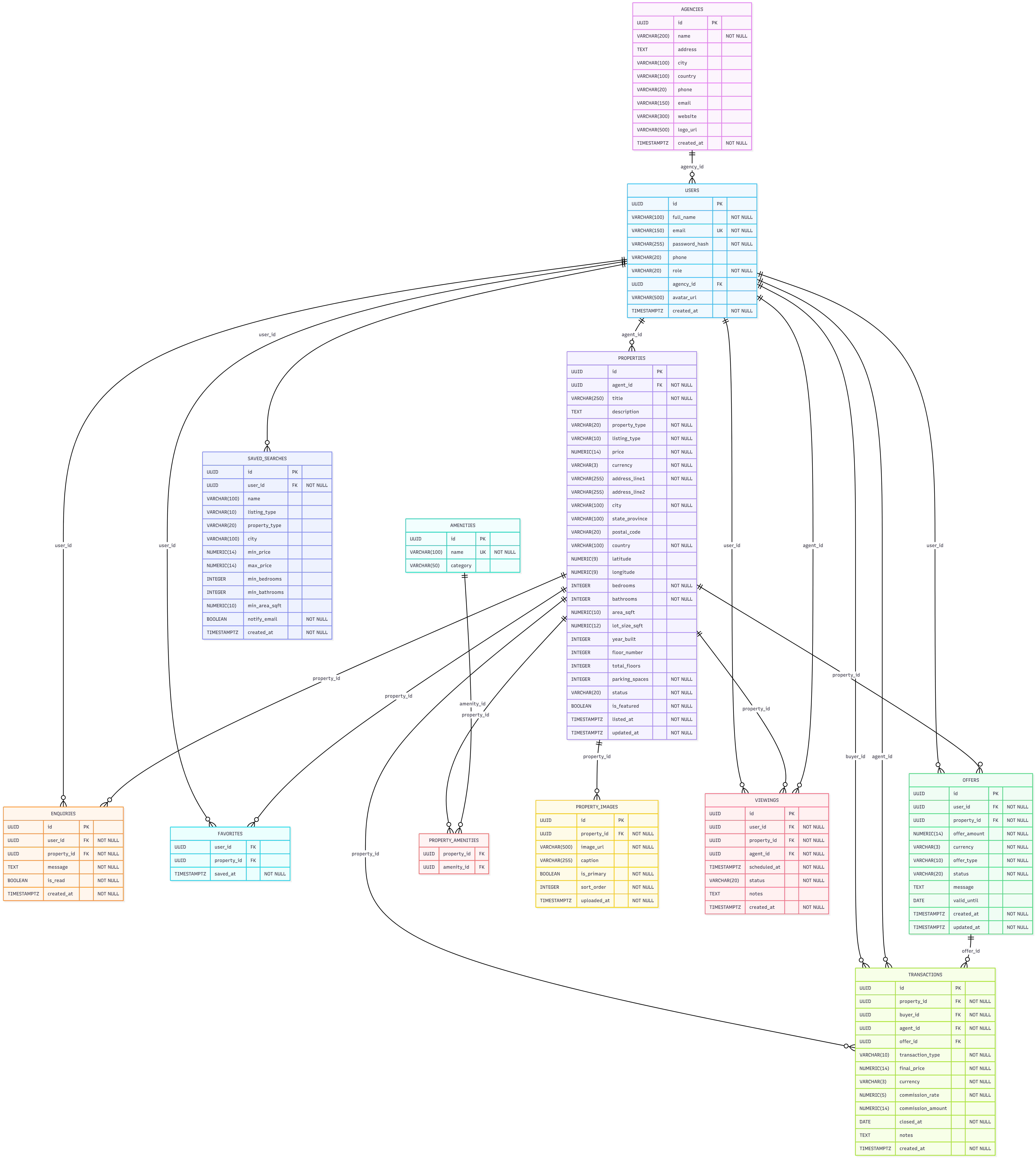
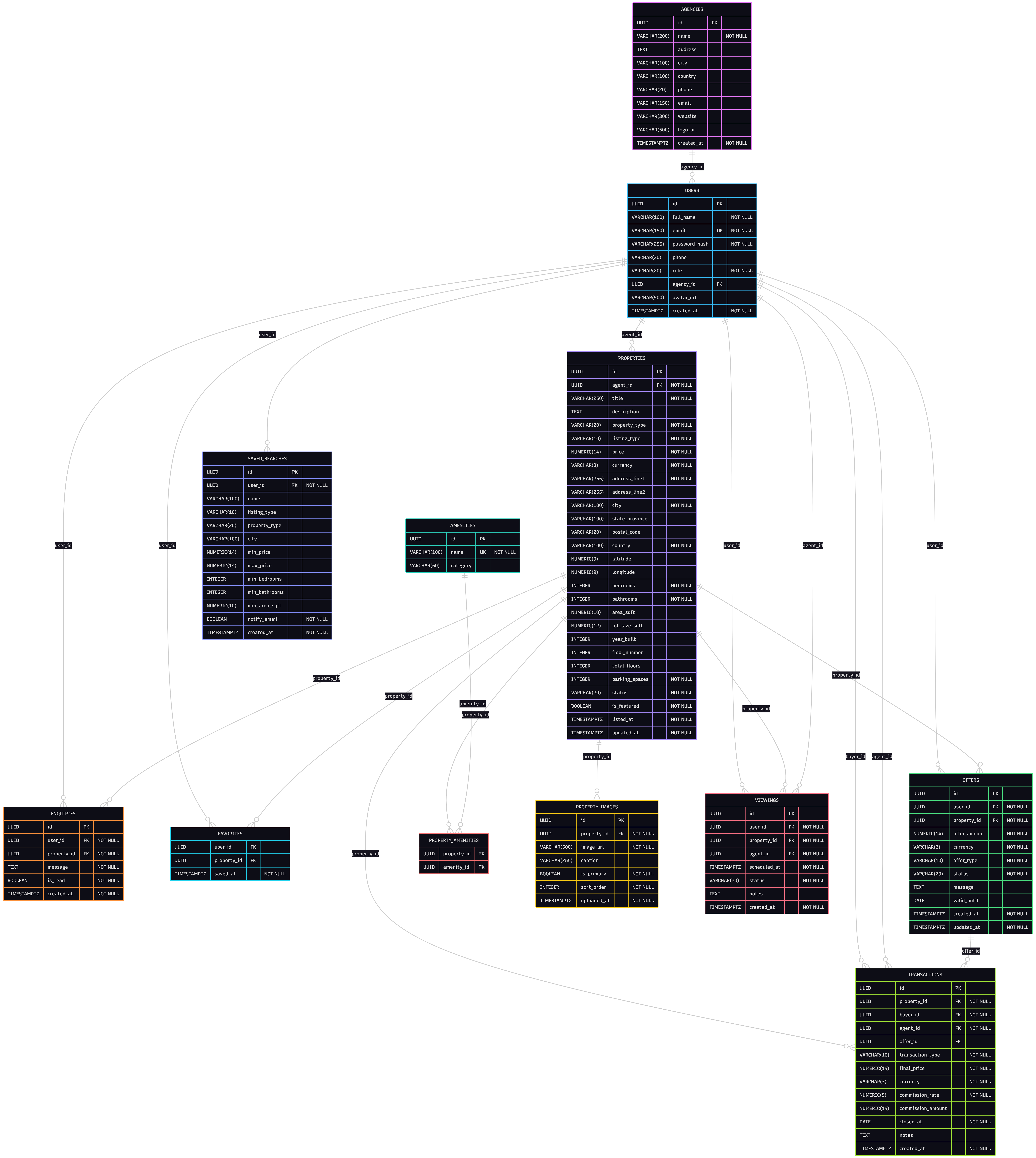
Key cardinalities:
agencies→users: one-to-many (one agency, many agents)users(agent) →properties: one-to-manyproperties→property_images: one-to-manyproperties↔amenities: many-to-many viaproperty_amenitiesproperties→offers→transactions: linear lifecycle for a sale
Step 5: Example SQL Queries
Search for 3+ bedroom houses for sale under £800,000
Return active house listings in a city filtered by bedroom count and price, with the agent's name.
SELECT
  p.title,
  p.price,
  p.bedrooms,
  p.bathrooms,
  p.area_sqft,
  p.city,
  u.full_name AS agent_name
FROM properties p
JOIN users u ON p.agent_id = u.id
WHERE p.listing_type  = 'sale'
  AND p.property_type = 'house'
  AND p.city          = 'London'
  AND p.bedrooms      >= 3
  AND p.price         <= 800000
  AND p.status        = 'active'
ORDER BY p.price ASC;
Get full property details with all amenities
STRING_AGG is PostgreSQL's equivalent of MySQL's GROUP_CONCAT — it concatenates non-null values from a group into a single string, with an optional ORDER BY inside the aggregate.
SELECT
  p.title,
  p.description,
  p.price,
  p.bedrooms,
  p.bathrooms,
  p.area_sqft,
  p.year_built,
  STRING_AGG(a.name, ', ' ORDER BY a.name) AS amenities
FROM properties p
LEFT JOIN property_amenities pa ON p.id = pa.property_id
LEFT JOIN amenities a           ON pa.amenity_id = a.id
WHERE p.id = 'your-property-uuid-here'
GROUP BY p.id, p.title, p.description, p.price,
         p.bedrooms, p.bathrooms, p.area_sqft, p.year_built;
DBA Tip: In PostgreSQL you must include all non-aggregated
SELECTcolumns inGROUP BY. Unlike MySQL's lenient mode, PostgreSQL strictly enforces this — which prevents accidentally returning arbitrary values from ungrouped columns.
List an agent's active listings with their primary photo
A LEFT JOIN on property_images filtered to is_primary = TRUE brings back exactly one image row per property — or NULL for listings without a hero shot yet.
SELECT
  p.id,
  p.title,
  p.price,
  p.listing_type,
  p.status,
  pi.image_url AS primary_image
FROM properties p
LEFT JOIN property_images pi
  ON p.id = pi.property_id AND pi.is_primary = TRUE
WHERE p.agent_id = 'your-agent-uuid-here'
  AND p.status   = 'active'
ORDER BY p.listed_at DESC;
Find top-performing agents by closed deals this year
EXTRACT(YEAR FROM ...) and CURRENT_DATE are the PostgreSQL equivalents of MySQL's YEAR() and CURDATE().
SELECT
  u.full_name                AS agent_name,
  ag.name                    AS agency_name,
  COUNT(t.id)                AS deals_closed,
  SUM(t.final_price)         AS total_volume,
  SUM(t.commission_amount)   AS total_commission
FROM transactions t
JOIN users u         ON t.agent_id  = u.id
LEFT JOIN agencies ag ON u.agency_id = ag.id
WHERE EXTRACT(YEAR FROM t.closed_at) = EXTRACT(YEAR FROM CURRENT_DATE)
GROUP BY u.id, u.full_name, ag.name
ORDER BY total_volume DESC
LIMIT 10;
Get unread enquiries for an agent's properties
SELECT
  e.id               AS enquiry_id,
  p.title            AS property_title,
  u.full_name        AS enquirer_name,
  u.email            AS enquirer_email,
  e.message,
  e.created_at
FROM enquiries e
JOIN properties p ON e.property_id = p.id
JOIN users u      ON e.user_id     = u.id
WHERE p.agent_id = 'your-agent-uuid-here'
  AND e.is_read  = FALSE
ORDER BY e.created_at DESC;
Average price per square foot by city for active sale listings
NULLIF(area_sqft, 0) returns NULL when area_sqft is 0, which causes the division to produce NULL rather than a division-by-zero error. ROUND works identically to MySQL here.
SELECT
  city,
  COUNT(*)                                    AS total_listings,
  ROUND(AVG(price), 2)                        AS avg_price,
  ROUND(AVG(price / NULLIF(area_sqft, 0)), 2) AS avg_price_per_sqft
FROM properties
WHERE listing_type = 'sale'
  AND status       = 'active'
  AND area_sqft    > 0
GROUP BY city
HAVING COUNT(*) >= 5
ORDER BY avg_price_per_sqft DESC;
Upcoming confirmed viewings for an agent
SELECT
  v.id              AS viewing_id,
  p.title           AS property_title,
  p.address_line1,
  p.city,
  u.full_name       AS buyer_name,
  u.phone           AS buyer_phone,
  v.scheduled_at,
  v.notes
FROM viewings v
JOIN properties p ON v.property_id = p.id
JOIN users u      ON v.user_id     = u.id
WHERE v.agent_id     = 'your-agent-uuid-here'
  AND v.status       = 'confirmed'
  AND v.scheduled_at >= NOW()
ORDER BY v.scheduled_at ASC;
Extensibility
This schema is a solid foundation. Here's how to extend it cleanly without breaking existing functionality:
| Feature | Extension |
|---|---|
| Mortgage calculators | Add a mortgage_estimates table linked to a property_id and user_id — store principal, rate, term, and monthly payment so estimates are reproducible |
| Neighbourhood data | Add a neighbourhoods table (name, transport score, school rating, crime index) and a neighbourhood_id FK on properties |
| Virtual tour links | Add a virtual_tour_url column on properties, or a separate property_media table to support multiple tour formats |
| Agent reviews | Add an agent_reviews table with a UNIQUE (reviewer_id, agent_id) constraint — optionally gate writes so only users with a completed transaction can leave a review |
| Property price history | Add a price_history table (property_id, old_price, new_price, changed_at, reason) populated by a trigger on properties.price updates |
| Automated email alerts | A background job matches new active listings against saved_searches rows and queues notification emails for matching users |
| Full-text search | Add a tsvector generated column on properties(title, description) with a GIN index for fast WHERE search_vector @@ to_tsquery(...) queries without an external search engine |
| Geo-radius search | Add the PostGIS extension and replace latitude/longitude with a GEOMETRY(Point, 4326) column; ST_DWithin then finds all listings within X km of a point |
DBA Tip: For geo-radius search,
NUMERIClatitude/longitude columns work fine for small datasets, but PostGIS with a spatial index becomes dramatically faster as listings grow. The column change is a one-time migration:UPDATE properties SET location = ST_SetSRID(ST_MakePoint(longitude, latitude), 4326).
Summary
We've designed a complete Real Estate Listings Platform schema using PostgreSQL — covering entities, relationships, and SQL queries to manage properties, agents, agencies, enquiries, viewings, offers, and transactions.
Key decisions made throughout:
- A single
userstable with arolecolumn andCHECKconstraint covers buyers, tenants, agents, and admins without duplicating contact fields - UUID primary keys keep IDs safe to expose in public URLs and API responses
VARCHAR + CHECKreplaces databaseENUMtypes so adding new statuses never requires a schema migrationNUMERICfor all money columns — exact decimal arithmetic, no floating-point roundingTIMESTAMPTZeverywhere — all timestamps are time-zone-aware, safe for multi-region deployments- Price and commission snapshotted in
transactionsat close time — immutable financial records that don't change when rates or prices are later updated - Targeted indexes on foreign keys, status columns, and date columns cover the most common query patterns without over-indexing
For hands-on learning, try building the ER diagram and running the sample queries on your local PostgreSQL setup — or paste the DDL directly into the SQLExplain sandbox to explore the schema interactively.
Try this schema in a live sandbox
Create a free SQLExplain account and land directly in a sandbox pre-loaded with the Real Estate Schema from this post — no password, no setup.